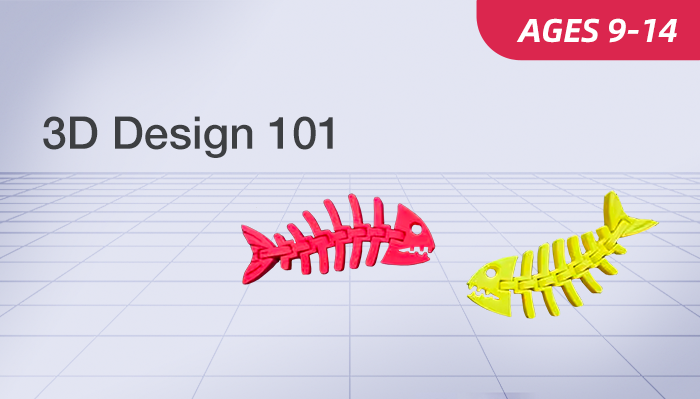

3D Design 101

Build Creative 3D Models with Tinkercad
Ages 9-14
10 Lessons
Online Live

Who This Course Is For

This course is ideal for creative kids aged 9 to 14 who love building, tinkering, and exploring the world of digital design. It is a perfect starting point for complete beginners who are curious about 3D printing and model making.
We welcome students who enjoy hands-on projects and are eager to turn their imaginative ideas into tangible, digital creations. No prior technical experience or background is required—just bring your curiosity and enthusiasm for making things.

What Students Will Learn and Create

Basic 3D Skills

Master Tinkercad’s basic 3D design tools

Model Design

Design simple 3D furniture and box models

Creative Modeling

Create unique 3D characters and inventions

Scene Creation

Build a complete 3D diorama step by step

Course at a Glance

  • Ages: 10-14
  • Level: Advanced
  • Format: Live, instructor-led online class
  • Duration: 10 classes (60 minutes per class)
  • Class Size: Small groups (8–10 students)
  • Tool: Tinkercad (Free)
  • Focus: 3D Design Basics & Creative Modeling

What Students Will Build

  • Custom 3D storage box designs
  • Mini 3D furniture model sets
  • Simple 3D invention prototypes
  • Original 3D character model designs
  • Complete 3D diorama scene works

What Parents & Students Say About Our Live Classes

Students receive guided, step-by-step instruction and ongoing platform support throughout their self-paced learning journey.
 The self-paced mode fits kids’ learning rhythm well. Step-by-step video guidance helps finish 3D diorama easily, bringing strong sense of accomplishment to kids. 
Parent of a 10-year-old student
 A 12-year-old grasped 3D design fast with self-paced lessons. Clear video explanations made Tinkercad easy to master, and a lovely 3D character was finished in free time. 
Parent of a 12-year-old student

Class Schedule & Enrollment

  • Class A
    1/01/2026 – 01/17/2027
    Every Sun • 10:00–11:00 AM (EST)
  • Class B
    11/01/2026 – 01/17/2027
    Every Wed・6:00–7:00 PM (EST)

$349

Can't attend scheduled sessions?

Course Details

Overview

Hardware

FAQ’s
Gallery

Course Overview

3D Design 101 is a beginner-friendly live online course for kids aged 9-14, all projects completed on free Tinkercad platform. No prior 3D design experience is needed—this course leads young learners step-by-step into the world of digital 3D modeling, with fun, hands-on lessons tailored to their cognitive level and creativity.
Through 10 well-structured lessons, students start with basic 3D shapes and Tinkercad operations, moving on to practical and creative modeling. The course blends skill learning with creative expression, making it easy for kids to grasp core 3D design basics while unleashing their imagination in every project.

What You’ll Learn

  • Master Tinkercad core basic operation skills
  • Design 3D models with basic geometric shapes
  • Create custom 3D box and furniture models
  • Learn 3D model importing and basic editing
  • Build unique creative 3D character models
  • Design complete vivid 3D diorama scenes

What You'll Need?

1. Computer
A Windows PC or macOS laptop
  • Minimum 4GB RAM (8GB recommended for smoother experience)
  • USB port (or adapter)
  • A stable high-speed internet connection
2. Software/Account
Tinkercad account (Free to register on official website)

Frequently Asked Questions

1. What is 3D Design 101?
3D Design 101 is a beginner 3D design course for 9-14-year-olds, using Tinkercad to learn basic 3D modeling and create various creative 3D works from boxes to dioramas.
2. Do students need prior experience for 101?
No. This is a beginner-level course, so students don’t need any 3D design or Tinkercad experience to join.
3. How are the classes conducted?
Students can learn in three flexible formats:
  • Live Online – interactive sessions with American instructors
  • Self-Paced – video lessons to study anytime
  • In-Person – available at select EonSTEM Academy locations
4. Is Tinkercad free to use?
Yes. Tinkercad is a free online 3D design tool for beginners, and students only need to register a free account on the official website to use it.

Curriculum & Video Lessons

Enrolled students can access all video lessons and project materials below.

Keep Your Kid’s Coding Fun Going

Drone Block Coding 101

Age: 10-14
Level: Intermediate

AI Smart Lab 101

Age: 12–16
Level: Beginner